
The complete beginner’s guide - what templates are, why WhatsApp requires them, and how approval works. No prior knowledge needed.
Too Long? Read This First
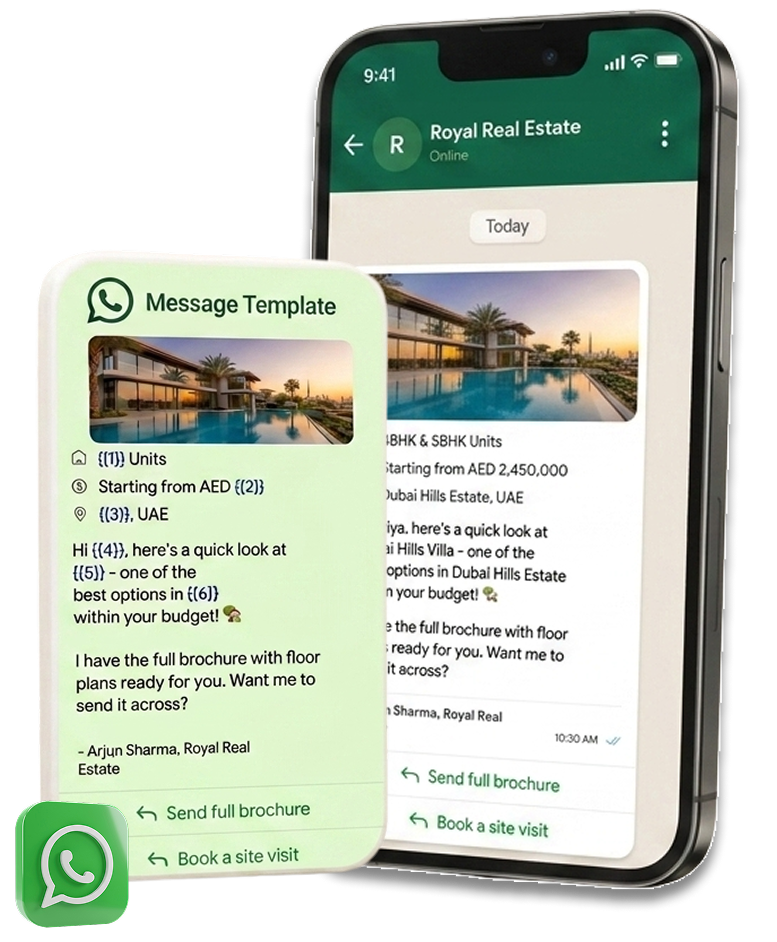
A WhatsApp template message is a pre-written message format that you get approved by Meta (the company behind WhatsApp) before you can send it. Instead of typing a fresh message every time, you fill in a few blanks - called variables, written as {{1}}, {{2}} and so on - inside a message shape that Meta has already reviewed and cleared.
For example, a template body might read: “Hi {{1}}, thanks for your interest in {{2}}. We'd love to connect!” When you send it to a lead named Farah who enquired about a 2-bedroom apartment, emblit fills in the variables automatically so she receives: “Hi Farah, thanks for your interest in 2-bedroom apartments. We'd love to connect!”

WhatsApp's whole design is built around protecting people from spam. So it has one simple rule, often called the 24-hour customer service window:
Once a lead messages your WhatsApp number, you can reply with anything you want - completely free-form - for the next 24 hours. After 24 hours of silence, WhatsApp closes that window. To reach the lead again, you can no longer send a free-form message - you must use an approved template.
This is exactly why templates matter for follow-ups, reminders, and re-engaging leads who've gone quiet: they're your only way back into the conversation once that 24-hour window closes. It also means the FIRST message you ever send to a brand-new lead (one who hasn't messaged you yet, e.g. from a Facebook lead ad) must always be a template too, since no conversation window is open yet.
Every template must be filed under one of three categories. The category you choose affects how fast Meta reviews it, and what kind of content is allowed:
| Category | What it's for | Approval time | Example |
|---|---|---|---|
| Utility | Transactional, expected updates directly tied to something the lead already asked for or agreed to - confirmations, reminders, status updates. | Minutes, often instant | “Hi {{1}}, your site visit is confirmed for {{2}}.” |
| Marketing | Promotional content - offers, announcements, re-engagement nudges, anything trying to get the lead to take a new action. | 1–24 hours | “Only 3 units left at {{1}} - book a call before they're gone!” |
| Authentication | One-time passcodes (OTPs) and login/verification codes only. | Minutes (priority review) | “Your verification code is {{1}}.” |
Pick the category honestly.Meta compares the category you chose against the actual wording - a promotional offer filed as “Utility” to get faster approval is one of the most common reasons templates get rejected.
The single most useful skill is looking at a message you want to send and instantly knowing which category it belongs to. The test is simple: ask what the message is trying to do.If it delivers something the lead is already expecting, it's Utility. If it's trying to win new attention or push a sale, it's Marketing. If it's a login code, it's Authentication.
Here are real messages mapped to the right category:
| Message you want to send | Correct category | Why |
|---|---|---|
| “Hi {{1}}, your site visit is confirmed for {{2}} at {{3}}.” | Utility | Confirms something the lead already booked - expected, transactional. |
| “Reminder: your call with {{1}} is tomorrow at {{2}}.” | Utility | A reminder for an appointment they agreed to - no new ask. |
| “We received your enquiry, {{1}} - an agent will call you within 2 hours.” | Utility | Acknowledges an action the lead just took. Follow-up to their request. |
| “New waterfront project just launched in {{1}} - want the brochure?” | Marketing | Introduces something new to spark interest - promotional. |
| “Still thinking it over, {{1}}? Only 2 units left at {{2}}.” | Marketing | Re-engagement nudge with urgency - trying to drive a new action. |
| “Get 5% off if you book a viewing this week!” | Marketing | A promotional offer - the clearest Marketing case. |
| “Your verification code is {{1}}. It expires in 10 minutes.” | Authentication | A one-time passcode - the only thing Authentication is for. |
The grey area to watch:a message can slide from Utility into Marketing the moment it adds a promotion. “Your visit is confirmed for {{1}}” is Utility - but “Your visit is confirmed for {{1}}, and ask about our limited-time 5% discount!” becomes Marketing. When a message does two jobs, Meta categorises it by the promotional part.
In emblit's builder you don't have to guess - the Ready-made packages and Ask AI preset the category for you, so a ready-made template is always filed in the right category automatically. See How to Create a WhatsApp Template in emblit.ai.
First, who charges what. Two companies are involved when a template goes out:
How Meta bills (since 1 July 2025): WhatsApp moved from the old per-conversation model to per delivered message. You're charged each time a template is delivered, priced by its category and the recipient's country code. Approximate rates for UAE (AED) numbers:
| Category | Approx. AED per delivered message | Notes |
|---|---|---|
| Marketing | ≈ AED 0.10 – 0.15 | Charged on every send. Excluded from Meta's volume discounts. |
| Utility | ≈ AED 0.02 – 0.04 | Free inside the 24-hour service window; charged only outside it. Volume discounts apply. |
| Authentication | ≈ AED 0.04 – 0.06 | Priced similarly to Utility. Volume discounts apply. |
| Service (free-form replies) | Free | Your replies to a lead within the 24-hour window. No template, no charge. |
These AED figures are indicative, not a quote.Meta changes its rates and they vary slightly by messaging tier. For the exact, current number, always use Meta's official rate card: Meta WhatsApp pricing documentation.
What this means in practice: two things save you the most money. First, reply to leads insidethe 24-hour window wherever possible - those messages are free. Second, don't file a transactional message as Marketing just to be safe: a confirmation or reminder filed correctly as Utility can cost a fraction of the Marketing rate, or nothing at all inside the window.
A template is built from a few optional and required building blocks. You'll see these exact pieces when you build one in emblit - read How to Create a WhatsApp Template in emblit.ai for the full walkthrough.
{{1}} for personalisation.{{1}}, {{2}} that get swapped for real values - a name, a date, a property - every time the template is sent.Once you submit a template, it goes through a review process on Meta's side - you don't need to do anything except wait and check back:

Good news:emblit's template builder automatically fixes many of these before they ever reach Meta - see the tips in the how-to guide.
Yes - templates only exist for the WhatsApp Business Platform (API), not the regular WhatsApp Business app. emblit connects to the API for you through Integrations.
No - editing the text of an approved template resets it to Pending and it has to be re-reviewed. Small typos mean resubmitting, so it's worth proofreading before you submit.
Since 1 July 2025 Meta charges per delivered template message, and the rate depends on category and the recipient's country. For UAE (AED) numbers, Marketing is roughly AED 0.10–0.15 per message, while Utility and Authentication are far cheaper (roughly AED 0.02–0.05) - and Utility templates are free when sent inside the lead's 24-hour service window. emblit passes Meta's cost through with no markup. Always check Meta's official rate card for the current exact figure.
Yes. Your free-form replies to a lead within the 24-hour service window (service messages) are free, and Utility templates sent inside that same window are also free. Marketing templates are always charged.
There's no hard cap from Meta, but templates read best with 2-4 variables. Too many makes the message feel robotic and increases the chance of a formatting mistake.
Yes - that's the point. You write it once with variables, and emblit fills in each lead's specific details (name, property, date) automatically every time it's sent.
Meta gives a reason. You fix the issue in emblit's builder and resubmit - there's no limit on how many times you can try again.
This guide is written for beginners; the official Meta docs are the authoritative, always-current source for the exact rules, rates, and category definitions:
Ready to build your first one? Read How to Create a WhatsApp Template in emblit.ai →